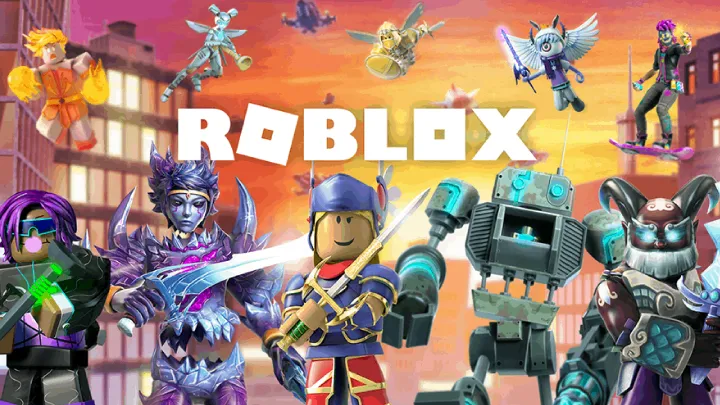
Welcome to Roblox, a global platform that's part game, part social network, and part creative hub. With millions of user-created experiences, Roblox offers a universe of adventure, but it can be overwhelming for a newcomer. This comprehensive guide will walk you through everything you need to know, from your first steps as a player to becoming a creator. We'll cover how to find the best games, customize your avatar, and even start building your own virtual world.
Getting Started: Your First Steps on Roblox
After creating your account, the first thing you'll see is the home page. This is your portal to a massive library of games, or "experiences," as they are called on the platform. The home page features a variety of curated lists, including popular games, games friends are playing, and personalized recommendations. Don't worry about being an expert; the most important step is simply exploring and getting comfortable with the interface.
Your first interaction with the platform should be setting up your profile. You can add a profile picture and write a short description to let others know a little about you. It's also a good idea to adjust your privacy settings to control who can send you messages and friend requests. Roblox is a social platform, and creating a safe and fun environment for yourself is the top priority.
Finding Games: Navigating the Roblox Catalog
With millions of games to choose from, finding the right one can feel like a daunting task. The best way to start is by using the search bar or browsing the different categories. You can search for specific game genres, such as "Obby" (obstacle course), "Tycoon," "Simulator," or "Roleplay." The most popular games are usually listed at the top, and they often provide a good starting point for new players.
You can also use the filter options to narrow down your search. You can sort games by player count, popularity, or relevance. The "Recently Updated" tab is a great way to find new content from your favorite creators. Don't be afraid to try a variety of games. A big part of the fun on Roblox is discovering new and unexpected experiences.
How to Choose the Right Game
- Read the Description: The game's description and thumbnail give you a good idea of what the game is about. Look for information on the gameplay loop and any special mechanics.
- Check Player Reviews: Many games have a "like" to "dislike" ratio. A high percentage of likes usually indicates a well-made and enjoyable game.
- Join a Popular Server: In some games, you can choose which server to join. A server with many players is often more active and fun.
Understanding Gameplay: Controls and Mechanics
Every game on Roblox has its own unique rules and mechanics, but the core controls are generally the same. You'll move your character with the WASD keys on your keyboard (or a virtual joystick on mobile), and use your mouse to control the camera. Jumping, sprinting, and interacting with objects are usually done with a few standard keys. Take a moment in each new game to check the on-screen instructions or the help menu to learn its specific controls.
Most games on Roblox have some form of progression. You might earn in-game currency by completing tasks, which you can then use to buy new items or upgrades. Many games also feature a "Gacha" system, where you can spend currency to randomly get new items or characters. Understanding the progression system is key to making the most of your time in any game.
Making Friends: Socializing on Roblox
Roblox is a social platform at its core, and playing with friends makes the experience much more enjoyable. You can send friend requests to other players you meet in games or search for friends by their usernames. Once you're friends, you can join their games directly or invite them to join yours. The platform also has a chat system, which allows you to communicate with friends and other players in a game.
Many games also have a "Party" or "Group" system, which allows you to team up with friends to complete missions or compete against other teams. Finding a good group of friends to play with can significantly enhance your fun on the platform. You can also join official groups for your favorite games to stay up-to-date on new content and meet other players who share your interests.
Customizing Your Avatar: Expressing Yourself
Your avatar is your identity on Roblox. The platform offers a vast catalog of clothing, accessories, and body parts that you can use to create a unique look. Some items are free, but most require Robux, the platform's virtual currency. You can mix and match items to create a style that's all your own.
You can also create your own clothing and accessories to sell to other players. This is a great way to express your creativity and earn some Robux in the process. Remember, your avatar is a reflection of you, so have fun with it and don't be afraid to try out new styles.
The Basics of Robux: Earning and Spending
Robux is the virtual currency of Roblox. You can use it to buy clothing, game passes, and special abilities in various games. While you can't earn Robux for free just by playing, there are a few ways to get it. The most common method is by purchasing it with real money. Roblox offers various Robux packages that you can buy.
You can also earn Robux by creating content for the platform. If you build a popular game and sell game passes or items, you can earn a percentage of the Robux spent by other players. For creators, this is the main way to get Robux without spending real money.
Your First Game: Building on Roblox
Roblox isn't just for playing games; it's also for making them. The platform has a free game-building tool called Roblox Studio. With Roblox Studio, you can create anything you can imagine, from a simple obstacle course to a complex role-playing game. The tool is beginner-friendly, with intuitive building tools that allow you to create terrain, buildings, and objects without any prior experience.
The best way to start is by watching some tutorials and experimenting with the different tools. You can start with a simple project, like building a house or a small parkour course. This will help you get familiar with the interface and the building mechanics.
Scripting for Beginners: Coding Your First Game
Once you've mastered the building tools, you'll want to add some functionality to your game with code. The scripting language used on Roblox is Lua. While this might sound intimidating, Roblox Studio has a built-in code editor and plenty of resources to help you get started. You can learn how to make a button that teleports a player or a door that opens when a player touches it.
There are countless free tutorials on YouTube and on the Roblox Developer Hub that will teach you the basics of Lua. By learning to script, you can bring your game to life and create unique and interactive experiences for other players.
Monetization: Earning Robux from Your Creations
If your game becomes popular, you can start earning Robux from it. There are a few ways to monetize your game. The most common method is by selling Game Passes. A Game Pass is a one-time purchase that gives the player a permanent in-game advantage or special item. You can also sell Developer Products, which are smaller, one-time-use items, like a special potion or a speed boost.
Another way to earn Robux is through Premium Payouts. This is a system that automatically rewards creators with Robux based on the time that Premium subscribers spend in their game. This means that even if you don't sell anything, you can still earn Robux just by having players stay in your game.
Final Thoughts and Conclusion
Roblox is a platform of endless possibilities. By starting as a player and then venturing into the world of creation, you've unlocked the full potential of the platform. You can find millions of games to enjoy, build your own experiences, and even earn some Robux along the way. Remember to explore, create, and have fun. The Roblox community is vast, and there's always something new to discover.