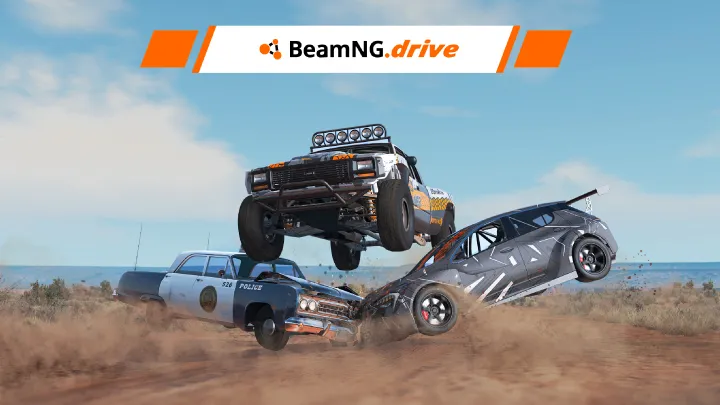





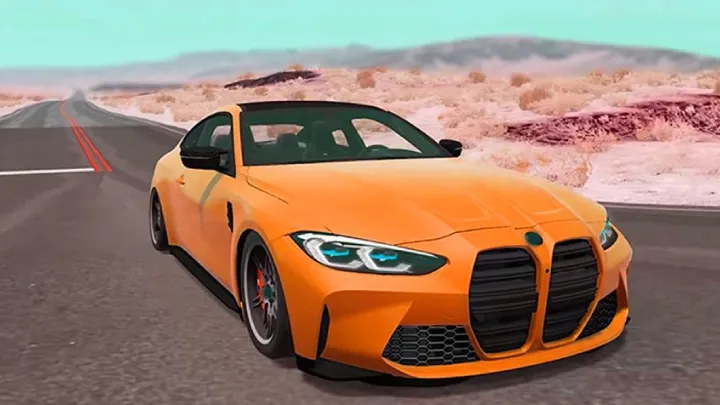
BeamNG.drive, a titan in the world of vehicle simulation, stands out not for high-octane racing or fantastical stunts, but for its unparalleled dedication to realistic, soft-body physics. This game is a sandbox of vehicular destruction and exploration, where every crash is a unique and mesmerizing display of deformation. It’s a physicist's playground and a car enthusiast's dream. For those new to this intricate world, the first step is acquiring the game, a process that, while straightforward, is unique to its status as a premium title. This guide will provide a detailed, expert-level walkthrough of the downloading and installation process, ensuring a smooth entry into the world of realistic car crashes and dynamic driving.
I. Understanding the Ecosystem: The Premium Purchase Model
Unlike many free-to-play titles, BeamNG.drive is a paid game. This means its download process is tied to a specific digital storefront, not a proprietary launcher like some other games. The developers have chosen a select number of trusted platforms to distribute the game. This choice simplifies the process and ensures that all users are getting an authentic, up-to-date version of the game, free from the risks associated with unofficial downloads.
The primary and most widely used platform for purchasing and downloading BeamNG.drive is Steam. Steam is a well-established and secure digital distribution service for video games, known for its extensive library, user-friendly interface, and built-in features like automatic updates and cloud saves. Acquiring the game through Steam is the recommended and most reliable method.

II. The Acquisition Process: Purchasing and Installing via Steam
The journey to playing BeamNG.drive begins with the Steam client. If you don't already have one, the first step is to create a Steam account and install the Steam desktop application. This process is a prerequisite for accessing the game and its future updates.
Once you have the Steam client running and are logged into your account, the process is as follows:
A. Navigating the Steam Store
The Steam client has a built-in store. You'll find a search bar at the top of the application. Simply type "BeamNG.drive" into this search bar and press enter. The game's official store page will appear as the top result. This page is the central hub for all official information about the game, including its description, system requirements, user reviews, and pricing.
B. The Purchase
On the game's store page, you will see a large button to purchase the game. After clicking this button, you'll be directed to a checkout page. Steam offers various secure payment methods, including credit cards, PayPal, and others, depending on your region. Once the transaction is complete, BeamNG.drive will be added to your personal Steam library.
C. Initiating the Download and Installation
After the purchase is successful, navigate to your Steam Library through the main menu. Here, you will see a list of all the games you own. Find BeamNG.drive in the list and click on it. On the game's library page, there will be an "Install" button. Clicking this button will initiate the download process.
Steam will then prompt you to choose an installation directory on your computer. It is crucial to select a drive with sufficient free space. The game's file size is substantial, and as with many modern games, it will grow with future content and updates. Once you've selected the directory, Steam will begin downloading the game files. The progress of the download will be displayed in the "Downloads" section of the Steam client.
III. System Requirements: A Technical Primer
BeamNG.drive is a physics-intensive game, meaning it relies heavily on your computer's processing power. To ensure a smooth and enjoyable experience, it is essential to verify that your system meets the game's minimum and, ideally, its recommended specifications. Running the game on a system that falls short can lead to significant performance issues, including low frame rates, stuttering, and an inability to handle complex physics calculations.
A. Minimum Requirements
These are the bare-bones specifications required to run the game at its lowest settings. Meeting these requirements will allow you to play, but you may experience performance limitations, especially when using multiple vehicles or large maps. Minimum requirements typically include:
- Operating System: A 64-bit version of Windows (Windows 10 or 11).
- Processor (CPU): A quad-core processor (e.g., Intel Core i3 or AMD equivalent). The game benefits from higher clock speeds.
- Memory (RAM): A minimum of 8 GB of RAM.
- Graphics Card (GPU): A dedicated graphics card with at least 1 GB of VRAM (e.g., NVIDIA GeForce GTX 550 Ti or AMD Radeon HD 7750).
- Storage: At least 25 GB of free space.
B. Recommended Requirements
For a truly immersive and smooth experience, you should aim to meet or exceed the recommended specifications. This will allow you to play with higher graphical settings, use more complex physics setups (e.g., more than one car), and explore larger environments without significant performance drops. Recommended requirements typically include:
- Operating System: A 64-bit version of Windows 10 or 11.
- Processor (CPU): A more powerful quad-core or hexa-core processor (e.g., Intel Core i7 or AMD Ryzen 7). The game scales well with more cores.
- Memory (RAM): A recommended 16 GB of RAM.
- Graphics Card (GPU): A dedicated graphics card with at least 4 GB of VRAM (e.g., NVIDIA GeForce GTX 1070 or AMD Radeon RX Vega 56).
- Storage: A solid-state drive (SSD) is highly recommended for faster loading times.
The developers of BeamNG.drive are continuously optimizing the game, so it's a good practice to check the official store page for the most up-to-date system requirements before making a purchase.
IV. Post-Installation and First Launch
Once the download is complete, Steam will automatically handle the installation. You will be able to launch the game directly from your Steam Library. The first time you launch BeamNG.drive, it may perform a few initial setup tasks, such as compiling shaders or checking for minor updates. This process is automatic and essential for optimizing the game's performance on your specific hardware.
BeamNG.drive is a highly moddable game, with a massive community creating new vehicles, maps, and scenarios. The Steam Workshop is the primary hub for this content, and subscribing to mods is seamlessly integrated into the Steam client. This makes adding new content to your game an easy and risk-free process.
V. The Alternative: Humble Bundle and Direct Downloads
While Steam is the primary platform, BeamNG.drive has also been available through other trusted digital storefronts, most notably Humble Bundle. Acquiring the game through a Humble Bundle purchase provides you with a Steam key, which you can then redeem within the Steam client. This redirects the process back to the Steam ecosystem for download and management, ensuring consistency and reliability.
Direct downloads from the official BeamNG website were a method used in the past, but the development team now focuses its distribution efforts on Steam due to its robust infrastructure for updates, community features, and user management. This consolidates the user base and allows the developers to focus on what they do best: creating an incredible physics-based simulation.
VI. Troubleshooting Common Issues
While the download and installation process is generally smooth, you may encounter a few common issues.
A. Insufficient Disk Space
This is a frequent problem. The game requires a significant amount of storage space. If the Steam client notifies you that there is not enough disk space, you will need to free up storage on your chosen drive by deleting old files or uninstalling other programs.
B. Download Corruption
If the download is interrupted or a file becomes corrupted, Steam has a built-in verification tool. To use it, right-click on BeamNG.drive in your Steam Library, go to "Properties," then the "Installed Files" tab, and click "Verify integrity of game files." This tool will scan and automatically repair any damaged files without requiring a full re-download.
C. System Compatibility
If the game crashes on launch, it's often a sign of a system that doesn't meet the minimum requirements or an issue with a graphics driver. Ensure your graphics drivers are up to date and that your system meets the specifications listed on the store page.
Conclusion
Downloading BeamNG.drive is a straightforward process tied to a secure and reliable digital storefront. By understanding its premium distribution model and using trusted platforms like Steam, you can ensure a smooth and hassle-free installation. Once the game is on your system, you are free to explore its deep and intricate world of soft-body physics. From meticulously detailed car crashes to dynamic off-road adventures, BeamNG.drive offers an unparalleled experience for those who appreciate the science of vehicle dynamics. Now that you know the technical steps, all that's left is to buckle up and start your journey.