







A stable internet connection is no longer a luxury in 2025; it is a necessity for work, learning, communication, and entertainment. Yet, many users still struggle with weak Wi-Fi signals, dead zones in their homes, or slow speeds during peak usage hours. Whether you are in the middle of an important video call, streaming your favorite series, or gaming online, a weak Wi-Fi connection can be extremely frustrating.
Fortunately, technology has evolved, and today there are mobile applications that help you analyze, optimize, and significantly improve your Wi-Fi signal. These apps allow you to understand how your router is performing, check for interference, find the best channel, or even secure your network against unwanted users.
In this guide, we will explore the top 5 apps to improve your Wi-Fi signal in 2025, along with practical tips and insights to ensure that your internet runs smoothly everywhere in your home or office.
Why Wi-Fi Signal Weakens
Before jumping into apps, it’s important to understand why Wi-Fi signals degrade. Wi-Fi signals travel through radio waves, and several factors can interfere with them:
- Physical barriers like concrete walls, metal appliances, or furniture.
- Interference from neighboring Wi-Fi networks or electronic devices such as microwaves.
- Router limitations or outdated hardware.
- Incorrect placement of the router.
- Too many devices connected at once.
By identifying the cause of your weak signal, you can take targeted actions to fix it. And this is where Wi-Fi improvement apps come in—they give you detailed insights and tools that go beyond what your default router settings can provide.
Criteria for Choosing the Best Wi-Fi Signal Apps
Not all apps are created equal. To select the best ones for this list, we considered the following:
- Ease of use: The app should be intuitive and beginner-friendly.
- Accuracy: Reliable scanning and analysis features.
- Compatibility: Works on Android and iOS devices.
- Additional features: Network security, channel suggestions, or speed tests.
- Reputation: Highly rated by users and trusted in the tech community.
Based on these criteria, here are the five best apps for boosting Wi-Fi signal quality in 2025.
1. NetSpot
NetSpot is one of the most advanced Wi-Fi analysis and optimization apps available today. Originally developed for desktop platforms, it now has a powerful mobile version that provides detailed heatmaps of your Wi-Fi coverage.
With NetSpot, you can visualize exactly where your Wi-Fi signal is strong and where it is weak. The app allows you to walk around your home or office while it maps the strength of the signal in real time. This feature is extremely useful for identifying dead zones or poorly covered areas.
NetSpot also helps you analyze channel distribution, which is key to reducing interference from neighboring networks. If multiple Wi-Fi networks are using the same channel in your area, you will experience slower speeds and instability. NetSpot identifies the best channel to switch to, helping you achieve smoother connectivity.
Another benefit of NetSpot is its user-friendly interface. Even though it offers professional-grade tools, you don’t need to be a network engineer to understand the results. For home users who want a quick solution or professionals managing large office networks, NetSpot remains one of the most reliable apps to improve Wi-Fi signal.

2. WiFi Analyzer
WiFi Analyzer is a classic app in the world of network optimization. Available mainly on Android, it transforms your smartphone into a powerful tool for diagnosing and fixing Wi-Fi issues.
When you open WiFi Analyzer, you immediately see which channels nearby networks are using. This visual representation makes it easy to spot overcrowded channels and pick one with less interference. By switching your router to the optimal channel, you can instantly improve your Wi-Fi performance.
The app also provides detailed insights into your signal strength in real time, so you can move around your home and find the best locations for stronger connections. It’s especially useful for deciding where to place your router or additional access points.
Another feature worth mentioning is its lightweight design. Unlike some heavy apps that require constant updates, WiFi Analyzer is simple, fast, and efficient. For those who want a no-nonsense solution, WiFi Analyzer is one of the best apps to boost Wi-Fi signal strength.
3. OpenSignal
OpenSignal is not only a Wi-Fi tool but also a comprehensive network coverage app that helps you test both Wi-Fi and mobile data performance. It provides detailed speed tests, latency measurements, and network availability checks.
One of its most useful features is the Wi-Fi coverage map. It shows you the best spots in your home for stronger signals and identifies areas where the connection is weakest. OpenSignal also compares your Wi-Fi with mobile networks, giving you an overall picture of your connectivity options.
Another highlight of OpenSignal is its community-driven data. The app collects anonymous information from millions of users worldwide to give you an accurate idea of network performance in your area. If you are experiencing constant Wi-Fi drops, you can use OpenSignal to determine whether the issue is with your router, your internet provider, or external interference.
With its combination of speed testing, coverage analysis, and performance monitoring, OpenSignal is a must-have for anyone serious about improving Wi-Fi quality.

4. WiFi Doctor
WiFi Doctor is an all-in-one app that focuses not only on boosting Wi-Fi signal strength but also on network security. Many users don’t realize that unknown devices can connect to their network and consume bandwidth, slowing everything down. WiFi Doctor scans your network and identifies all connected devices, giving you the power to kick off unwanted users.
Beyond security, WiFi Doctor provides real-time monitoring of signal strength, speed tests, and optimization tips. One of its most practical features is automatic detection of weak connections. If your device is connected to a poor-quality signal, the app can recommend switching to a stronger one or reconnecting for better performance.
For households where multiple users are streaming, gaming, and working simultaneously, WiFi Doctor helps maintain balanced performance by ensuring that your bandwidth is used efficiently. If you value both speed and security, WiFi Doctor is a strong choice.
5. Fing
Fing is one of the most popular apps for network diagnostics and Wi-Fi troubleshooting. It is widely used by professionals and tech enthusiasts, but its clean design makes it easy for anyone to use.
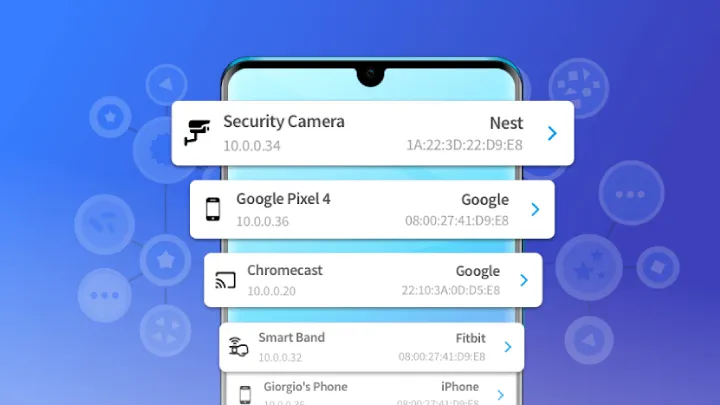
Fing scans your Wi-Fi network and instantly lists all devices connected to it. This is a powerful feature for identifying bandwidth hogs or detecting unauthorized devices. By keeping your network secure, you automatically free up more resources for your own use, improving your overall Wi-Fi experience.
The app also includes advanced features such as internet speed tests, Wi-Fi health analysis, and router vulnerability checks. For users who want detailed insights into their network without complicated technical terms, Fing is an excellent tool.
Another unique aspect of Fing is its compatibility with smart home devices. As more people adopt IoT gadgets in 2025, ensuring they all connect seamlessly to Wi-Fi becomes critical. Fing helps you detect problems quickly and maintain a smooth smart home environment.
Extra Tips to Improve Wi-Fi Without Apps
While apps are extremely helpful, you can further enhance your Wi-Fi by following some basic practices:
- Place your router in a central location away from walls and metal objects.
- Keep your router elevated rather than on the floor.
- Update your router firmware regularly.
- Use a Wi-Fi extender or mesh system for larger homes.
- Change your Wi-Fi channel to avoid interference.
- Limit the number of devices connected at the same time.
These simple actions combined with the use of Wi-Fi optimization apps can dramatically improve your experience.
The Future of Wi-Fi Optimization in 2025
As technology advances, Wi-Fi apps are becoming more intelligent, incorporating AI-driven analysis and predictive optimization. Some apps are now able to automatically adjust your router settings to deliver the best possible performance without requiring manual intervention.
Additionally, with the rise of Wi-Fi 6 and the upcoming Wi-Fi 7 standard, these apps will continue to evolve to ensure compatibility with newer devices and faster speeds. In the near future, you may not even need to open an app—your network will self-optimize in real time.
Frequently Asked Questions
Can these apps increase internet speed?
These apps don’t directly increase the speed provided by your internet service provider. Instead, they optimize your Wi-Fi connection by reducing interference, identifying the best channels, and improving coverage.
Are Wi-Fi optimization apps safe?
Most apps listed here, such as NetSpot, Fing, and OpenSignal, are reputable and widely used. Always download apps from official app stores to avoid security risks.
Do I need technical knowledge to use these apps?
No. The best apps are designed with user-friendly interfaces so that anyone can improve their Wi-Fi without being a tech expert.
Conclusion
Weak Wi-Fi signals are a common issue, but they don’t have to disrupt your life. With the help of powerful tools like NetSpot, WiFi Analyzer, OpenSignal, WiFi Doctor, and Fing, you can take control of your network, optimize performance, and eliminate frustrating dead zones.
When combined with smart practices like proper router placement and updated firmware, these apps can transform your internet experience in 2025. Whether you’re working from home, streaming 4K content, or gaming online, a reliable Wi-Fi connection is within your reach.
If you’re tired of buffering screens and dropped connections, it’s time to download one of these top 5 Wi-Fi improvement apps and experience the difference for yourself.