







Introduction
The iPhone has become much more than just a smartphone. For many professionals, creators, and everyday users, it serves as a portable studio, capable of recording, editing, and enhancing audio with incredible precision. From musicians and podcasters to students and hobbyists, sound processing apps have made it possible for anyone to achieve professional-quality audio without expensive studio equipment.
In the App Store, thousands of apps promise audio editing and sound processing, but not all of them deliver the level of quality, usability, and performance users expect. That’s why we’ve compiled a detailed guide to the top five sound processing apps for the iPhone in 2025. These apps stand out for their features, user experience, and ability to transform audio recording and editing into a seamless process.
Whether you are a beginner experimenting with sound design or a professional who needs a mobile editing suite, these apps will elevate your audio projects.
1. GarageBand
Why GarageBand is Essential
GarageBand is Apple’s flagship music and audio editing app, and it’s completely free for iPhone users. It offers an impressive range of tools for recording, editing, and mixing. With a wide selection of instruments, sound libraries, and loops, it allows users to create music tracks from scratch.
Key Features
- Multi-track recording with a simple drag-and-drop interface.
- Professional sound packs and virtual instruments.
- Integration with Logic Pro for advanced projects.
- Real-time effects such as reverb, echo, and EQ adjustments.
Who Should Use It
GarageBand is perfect for musicians, songwriters, and beginners who want to experiment with music production. Podcasters can also use it to mix audio tracks, add effects, and create polished episodes directly from their iPhones.
Why It Stands Out
What makes GarageBand stand out is its ability to bridge the gap between casual users and professionals. While it’s beginner-friendly, the depth of its tools rivals many paid apps. For iPhone users, it’s a must-have.
2. Ferrite Recording Studio
Why Ferrite Recording Studio is Powerful
Ferrite Recording Studio is designed specifically for voice recording, making it ideal for podcasters, journalists, and audiobook creators. Unlike GarageBand, which leans heavily toward music production, Ferrite focuses on spoken audio.
Key Features
- Multi-track editing with easy trimming and arrangement.
- Noise reduction and voice enhancement tools.
- Automatic ducking for background music.
- Support for external microphones and audio interfaces.
Who Should Use It
Ferrite is best suited for podcasters, reporters, and anyone who needs to produce clean, professional-sounding voice recordings. Its streamlined interface eliminates unnecessary clutter, letting you focus on storytelling.
Why It Stands Out
Ferrite combines simplicity with powerful editing capabilities. It is one of the few apps that caters specifically to spoken word professionals, making it invaluable in the growing world of podcasting and voice content.
3. Hokusai Audio Editor
Why Hokusai is a Great Choice
Hokusai Audio Editor is known for its balance between accessibility and professional-grade features. It supports multi-track editing, allowing users to mix sounds, add effects, and export high-quality files.
Key Features
- Multi-track editing with unlimited undo/redo.
- A wide range of effects including fade in/out, echo, reverb, and filters.
- Compatibility with WAV, MP3, and other formats.
- Clean interface optimized for quick editing.
Who Should Use It
Hokusai is a great choice for users who want a versatile tool without the steep learning curve of professional DAWs (Digital Audio Workstations). It’s ideal for both musicians and voice editors.
Why It Stands Out
Unlike many free apps that limit features behind paywalls, Hokusai provides a robust free version, with the option to expand via in-app purchases. It’s highly reliable for mobile editing, making it one of the best sound processing apps available.
4. AudioShare
Why AudioShare is Essential for File Management
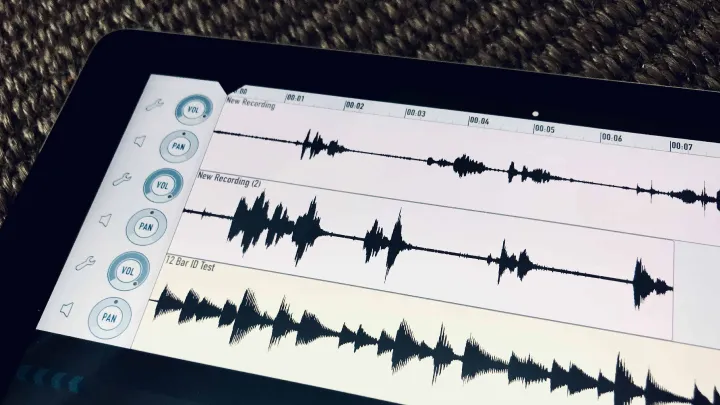
AudioShare is not just an audio editor but also a powerful audio file management tool. It allows users to record, edit, organize, and transfer audio files with ease.
Key Features
- High-quality audio recording and trimming.
- File management system for organizing large audio libraries.
- Integration with other apps and external hardware.
- Support for inter-app audio routing.
Who Should Use It
AudioShare is particularly useful for musicians and sound designers who need to manage large collections of samples and recordings. Podcasters who work with many audio clips will also find it valuable.
Why It Stands Out
Its seamless integration with other iOS apps and hardware makes AudioShare unique. It’s not just about editing; it’s about keeping your audio ecosystem organized and efficient.
5. Cubasis 3
Why Cubasis 3 Brings Studio Power to Mobile
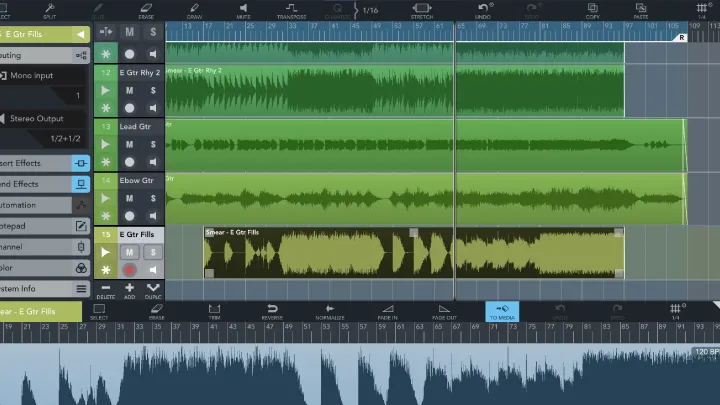
Cubasis 3, developed by Steinberg, is a full-featured Digital Audio Workstation designed for iOS. It brings professional studio capabilities directly to the iPhone.
Key Features
- Unlimited audio and MIDI tracks.
- Professional effects and virtual instruments.
- High-quality mixing console with automation.
- Compatibility with desktop DAWs for cross-platform projects.
Who Should Use It
Cubasis 3 is ideal for professionals who need a powerful DAW on the go. Musicians, producers, and engineers who already use Cubase on desktop will find its workflow familiar and efficient.
Why It Stands Out
Cubasis 3 stands out because it offers nearly everything you’d expect from a desktop workstation, but optimized for the iPhone. It’s not the cheapest option, but for professionals, it’s worth the investment.
Tips for Getting the Best Results from Sound Processing Apps
Use External Microphones
While the iPhone’s built-in microphone is good, pairing it with an external mic significantly improves audio quality. Most of these apps support external hardware seamlessly.
Experiment with Effects
Don’t just stick to basic trimming and volume adjustments. Use reverb, compression, and EQ to make your audio richer and more professional.
Organize Your Files
If you’re working on multiple projects, apps like AudioShare can save time by keeping everything neatly arranged and accessible.
Leverage Cloud Storage
Many apps integrate with iCloud or other services. Use these to back up your projects and avoid data loss.
The Future of Sound Processing on iPhone
As iPhones become more powerful, sound processing apps will continue to evolve. With the integration of AI, we can expect automatic noise reduction, smart mastering, and real-time voice enhancement to become standard features. The future points to an even greater democratization of audio production, where anyone with a phone can create studio-quality work.
Conclusion
Sound processing apps for the iPhone have transformed mobile devices into powerful creative tools. From GarageBand’s music production capabilities to Ferrite’s podcasting focus, and from Hokusai’s balanced editing to AudioShare’s file management and Cubasis 3’s professional DAW experience, each app offers unique strengths.
Choosing the right app depends on your needs—whether you’re a musician, podcaster, or casual editor, these five apps will help you achieve professional-quality audio. In 2025 and beyond, the iPhone is not just a communication device but also a portable sound studio in your pocket.