






Introduction
The iPhone is no longer just a device for communication. Over the years, it has transformed into a powerful hub for creativity, entertainment, and productivity. Among its many capabilities, sound processing stands out as an area where the iPhone shines. With the App Store offering thousands of applications dedicated to music, audio editing, and sound manipulation, users can now achieve what once required professional studios or expensive equipment. For music lovers, amateur producers, professional sound engineers, or even casual users who simply want better audio quality, there is an app available to suit every need.
But with so many options, making the right choice is not always easy. To help you narrow down the possibilities, we’ve explored, tested, and analyzed countless apps, eventually curating this list of the five best sound processing apps for iPhone in 2025. Each of these apps brings unique strengths, whether it’s advanced multi-track recording, live performance integration, realistic guitar simulations, fun DJ tools, or professional-grade editing. Let’s take a closer look at what makes them stand out.
1. Audio Evolution Mobile Studio – Mix & Master Like a Pro
When it comes to creating a complete musical project on an iPhone, few apps can match the power of Audio Evolution Mobile Studio. It essentially puts an entire recording studio in your pocket, offering multi-track digital audio workstation (DAW) functionality. Users can record vocals, layer instruments, arrange beats, and polish their songs with built-in effects.
What makes this app particularly impressive is the balance between professional-level features and mobile accessibility. It provides virtual instruments like drum machines and synthesizers, and it supports MIDI controllers for those who prefer tactile input. The range of effects, from reverb and compression to EQ adjustments, gives creators complete control over their sound. This flexibility makes it equally useful for beginners who want to experiment with simple recordings and for advanced users who aim to mix and master finished tracks ready for release.
There is a slight learning curve, especially for those new to music production, and some advanced plugins require additional purchases. However, once mastered, Audio Evolution Mobile Studio becomes a creative powerhouse. Its ability to deliver studio-quality output directly from an iPhone earns it a near-perfect rating among mobile producers.
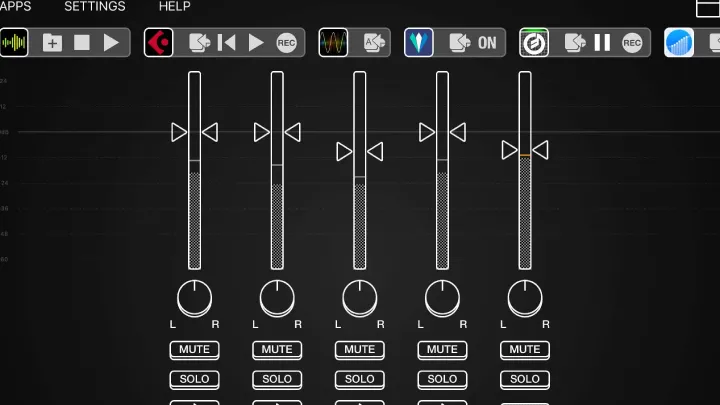
2. Audiobus – Connect Multiple Music Apps Together
For musicians who thrive on experimentation and prefer to work with several apps simultaneously, Audiobus is an indispensable tool. It functions like a virtual patch bay, allowing different music applications on your iPhone to connect and interact with each other in real time.
Instead of switching constantly between multiple screens, users can route audio seamlessly from one app to another. For instance, you can take a synth line created in one program, run it through effects in another, and then record it in a third, all without leaving your iPhone. This makes it especially powerful for live performers who want to control complex setups with minimal hassle.
The app also includes a large sound library to jump-start the creative process. That said, Audiobus is not the easiest app for complete beginners. Its routing system can be confusing at first, and it is best suited to those who already understand the basics of audio flow. However, once mastered, it provides a level of flexibility unmatched by most mobile tools. For live performers and adventurous producers, Audiobus is a gateway to a completely integrated mobile music ecosystem.
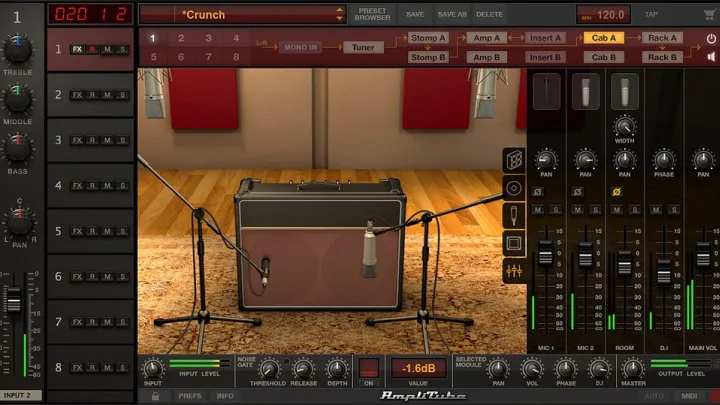
3. AmpliTube 4 – Add Realistic Amp Simulation to Any Track
Guitarists often face the challenge of carrying heavy amplifiers and pedalboards to rehearsals or gigs. AmpliTube 4 solves this problem by transforming the iPhone into a complete guitar rig. With over one hundred amp models and dozens of effects pedals, the app delivers tones that closely replicate professional hardware.
The strength of AmpliTube lies in its realism. From clean Fender-style tones to roaring Marshall stacks, the simulations capture the nuances that guitarists value. Users can also layer cabinets, adjust microphones, and create custom rigs tailored to their style. For added convenience, the app supports iRig and other external interfaces, allowing high-quality input directly from a guitar.
While some premium amps and pedals are only available through in-app purchases, the core offering is strong enough for most users. The built-in recording tools make it easy to capture riffs or full tracks directly within the app, making it invaluable for songwriters who want to preserve inspiration the moment it strikes. For guitarists who demand flexibility and tone quality without the bulk of physical equipment, AmpliTube 4 is a must-have.
4. Gadget – Create Unique Ringtones & DJ Tracks Instantly
Not every sound-processing app needs to feel like a professional studio. For those who want fun, creativity, and instant results, Gadget by Korg is the perfect solution. Designed as a collection of mini-synths and drum machines, Gadget provides everything from retro electronic sounds to modern EDM tools, all neatly packed into a mobile interface.
Its “Gadgetizer” mode allows users to create ringtones or quick tracks in minutes, while its DJ mode makes it possible to mix multiple songs live using intuitive crossfaders and decks. This makes the app appealing both to casual users who just want to personalize their iPhone with custom sounds and to DJs looking for a lightweight tool to experiment with mixes.
Although it doesn’t offer the deep functionality of a full DAW like Audio Evolution, Gadget shines in accessibility. Beginners can jump in without prior knowledge, and the wide selection of instruments and effects keeps the creative process exciting. Some advanced gadgets require additional purchases, but even the basic version offers more than enough for most hobbyists. For anyone who wants to have fun with music creation on the go, Gadget is an excellent choice.
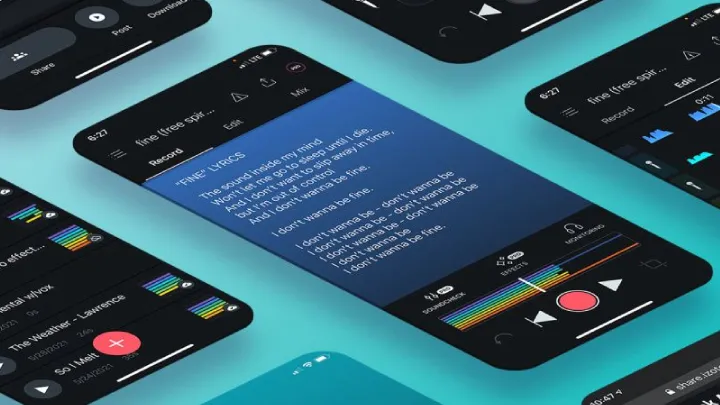
5. iZotope Spire Studio – Professional-Grade Mobile Production
iZotope has long been respected for its professional audio plugins on desktop, and with Spire Studio, the company has brought that expertise to iOS. This app is designed for musicians, podcasters, and content creators who want studio-quality sound in a mobile format.
Spire Studio supports multi-track recording, offering up to eight tracks per project. It comes with onboard editing tools like pitch correction, EQ adjustments, and reverb, ensuring that recordings sound polished without the need for extra equipment. The app also integrates smoothly with external microphones and MIDI controllers, giving professionals even greater control.
One of its standout features is AI-powered mixing, which automatically balances and processes tracks for quick demos. While purists may prefer manual adjustments, this feature saves time and is especially useful for beginners who want professional-sounding results without advanced knowledge. Some features require an internet connection and the free version is limited, but overall Spire Studio offers a premium mobile production experience that rivals traditional studio setups.
Comparison Table
Audio Evolution Mobile Studio is considered the top choice for full-scale music production. This app delivers studio-quality performance with a powerful DAW, virtual instruments, and flexible mixing options. However, beginners may find the learning curve challenging, and some features require payment. Its rating is 9.5/10.
Audiobus is best suited for live performance and app integration. Its greatest strength lies in seamless app routing and live flexibility. On the downside, it can be complicated for beginners to use. Audiobus holds a rating of 9/10.
AmpliTube 4 is ideal for guitarists. It offers highly realistic amp and pedal simulations, along with customizable rigs for personal setups. The main drawback is that premium content comes at an additional cost. AmpliTube 4 has a rating of 9.2/10.
Gadget is designed for DJs and casual creators. It stands out for being fun, intuitive, and particularly effective for creating ringtones or live mixes. However, it lacks the depth found in full DAWs. Gadget has a rating of 8.8/10.
iZotope Spire Studio caters to professional recording needs, providing AI-assisted mixing and external gear support. The biggest weakness is that its free version is quite limited. This app is rated 9.3/10.
Conclusion
The iPhone has evolved into a serious tool for audio professionals and enthusiasts alike. Whether your passion lies in full-scale music production, live performance, guitar tone crafting, DJing, or professional recording, the right app can transform your phone into a creative powerhouse.
Audio Evolution Mobile Studio is ideal for users who want a full digital studio at their fingertips. Audiobus shines for those who love connecting multiple apps in innovative ways. Guitarists will find AmpliTube 4 indispensable, while DJs and hobbyists will enjoy the accessibility and fun of Gadget. Finally, for professional-grade recording and editing, iZotope Spire Studio sets a high standard.
No matter which app you choose, the important takeaway is that sound processing on iPhone is no longer limited or secondary. With these tools, your phone can serve as a recording studio, a live performance rig, and a creative playground all at once, ensuring that music creation remains more accessible and inspiring than ever before.