

Gaming has evolved far beyond just playing. Today, gamers love to record gameplay videos to share epic moments, create tutorials, or even build careers as content creators on platforms like YouTube, Facebook Gaming, or Twitch. To do this effectively, a reliable screen recording app is essential.
But not every recording app is created equal. Some provide high-quality recordings with minimal lag, while others sacrifice quality for speed. Choosing the right one depends on your device, performance needs, and editing requirements.
In this article, we will explore the top 5 screen recording apps for gaming in 2025, analyze their strengths and weaknesses, and give you an overview of how they perform. Whether you are a beginner who wants to capture casual gameplay or a professional streamer aiming for top-quality content, these apps will help you achieve your goals.
1. OBS Studio (Windows, macOS, Linux)
Overview
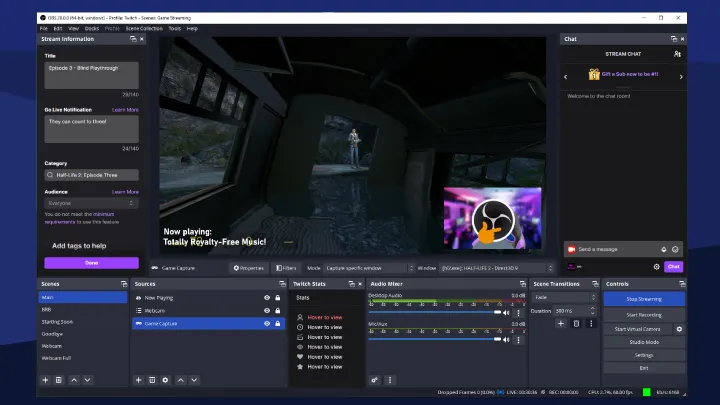
OBS Studio is one of the most popular open-source screen recording and live-streaming apps. It’s widely used by professional gamers and streamers for its flexibility and powerful features.
Strengths:
- Completely free and open-source.
- Unlimited recording with no watermark.
- Supports overlays, multiple scenes, and live streaming.
- High-quality output with customizable settings.
Weaknesses:
- Steeper learning curve for beginners.
- Requires a good system setup for smooth performance.
Review:
OBS Studio is perfect for serious gamers and content creators who want complete control over their recordings. While it might take some time to learn, once mastered, it delivers professional-grade results without costing a dime.
2. Nvidia ShadowPlay (Windows with Nvidia GPU)
Overview
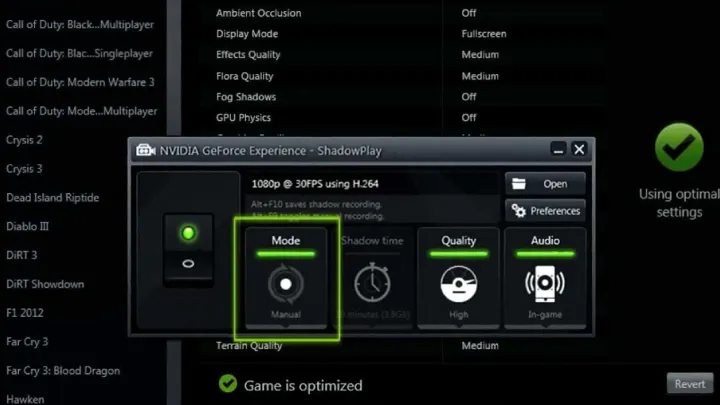
Exclusive to Nvidia graphics card users, ShadowPlay is a lightweight screen recorder that uses GPU acceleration to minimize performance impact while gaming.
Strengths:
- Minimal performance drop due to GPU-based recording.
- Instant replay feature to capture highlights retroactively.
- Simple and easy to use.
- Free for Nvidia GPU owners.
Weaknesses:
- Only available on Nvidia GPUs.
- Limited customization compared to OBS Studio.
Review:
ShadowPlay is excellent for gamers who want quick, high-quality recordings without much setup. The instant replay feature makes it ideal for capturing unexpected gaming highlights, though it lacks advanced editing options.
3. Bandicam (Windows)
Overview
Bandicam is a popular premium screen recorder known for its lightweight design and ability to compress video while maintaining quality.
Strengths:
- High-quality recording with small file sizes.
- Supports 4K Ultra HD recording at high FPS.
- User-friendly interface for beginners.
- Game recording mode for smooth capture.
Weaknesses:
- Free version has a watermark and time limit.
- Paid license required for full features.
Review:
Bandicam strikes a balance between quality and ease of use. It’s a great choice for beginners who don’t want to get lost in advanced settings but still want crisp recordings. The only downside is that the free version is limited.
4. Mobizen Screen Recorder (Android)
Overview
For mobile gamers, Mobizen is one of the most popular screen recording apps available on Android. It’s widely used for capturing mobile gameplay without requiring root access.
Strengths:
- Easy to use with one-tap recording.
- Records in Full HD (1080p) with 60fps.
- Built-in editing tools.
- Free to use with optional premium features.
Weaknesses:
- Free version includes watermarks.
- Occasional performance drops on low-end devices.
Review:
Mobizen is a must-have for mobile gamers who want to record smooth gameplay videos. With its editing tools, you can quickly cut and upload videos to YouTube or social media. However, premium is recommended for watermark-free recordings.
5. DU Recorder (iOS & Android)
Overview
DU Recorder is a cross-platform app available for both Android and iOS. It offers not just recording but also streaming and basic video editing.
Strengths:
- High-quality screen recording with customizable resolution and FPS.
- Built-in live streaming to YouTube, Twitch, and Facebook.
- Video editing tools like trimming, adding music, and subtitles.
- Supports both Android and iOS.
Weaknesses:
- Some advanced features require premium.
- Can drain battery quickly during long sessions.
Review:
DU Recorder is versatile and user-friendly, making it a strong option for gamers who want to record and stream simultaneously. Its editing tools make it a complete solution for mobile content creators.
Strengths and Weaknesses of Screen Recording Apps
Strengths
- High-Quality Content: Most apps allow up to 4K resolution and 60fps recording.
- Easy Sharing: Many apps integrate directly with YouTube, Twitch, or Facebook Gaming.
- Built-In Editing: Some apps allow trimming, cutting, and adding overlays.
- Accessibility: Available across PC, Android, and iOS.
Weaknesses
- Performance Impact: Recording can lower FPS in demanding games.
- Watermarks & Limits: Free versions often restrict features.
- Device Limitations: Some apps are platform or hardware-specific (e.g., Nvidia ShadowPlay).
- Battery Usage: Mobile recorders may overheat devices and drain batteries quickly.
Conclusion
Choosing the right screen recording app depends on your device and goals:
- For PC gamers, OBS Studio is the best all-around solution, offering professional tools for free, while Bandicam is a solid choice for beginners who prefer simplicity.
- For Nvidia GPU owners, ShadowPlay is unbeatable in terms of low impact and instant replay features.
- For mobile gamers, Mobizen and DU Recorder stand out as the top options for smooth recording and easy editing.
Whether you’re capturing highlights for fun or creating professional gaming content, these five apps ensure that your gameplay is recorded smoothly and in high quality.
With the right screen recorder, you can showcase your skills, share your gaming journey, and even start a career as a gaming content creator.