




Photography has always been about capturing fleeting moments, freezing emotions, and preserving memories that words alone cannot fully express. For decades, professional-quality photography required expensive cameras, complicated equipment, and years of training. If you wanted a stunning portrait or a breathtaking landscape shot, you either had to be a skilled photographer or hire one. But the digital revolution changed everything, and in the last decade, smartphones and mobile applications have taken that transformation even further.
Today, photography is more democratic than ever before. With a smartphone in your pocket and the right set of apps installed, you can achieve results that rival professional photographers armed with heavy DSLR cameras. Whether you want to capture everyday moments, edit them into works of art, or share them instantly with the world, there are powerful tools at your fingertips. The line between hobbyists and professionals has blurred, thanks to apps that offer advanced editing features, intuitive design, and powerful AI-driven enhancements.
But with thousands of apps available across iOS and Android platforms, choosing the right ones can be overwhelming. Some apps focus on quick edits with filters, while others mimic the precision of professional desktop software. Some cater to social media creators who need speed and style, while others are designed for meticulous perfectionists who obsess over every pixel. That’s why we’ve curated a list of the 5 must-have apps that stand out above the rest. These apps are not only popular but also versatile, reliable, and capable of delivering professional-quality photos without the steep learning curve.
In this comprehensive guide, we’ll take a deep dive into each app—exploring their unique features, strengths, and limitations. We’ll also discuss how they compare to each other, what types of users they’re best suited for, and how they can fit into your creative workflow. By the end, you’ll know exactly which apps deserve space on your device and how to use them to take your photography from ordinary to extraordinary.
1. Adobe Lightroom CC – The Professional’s Playground
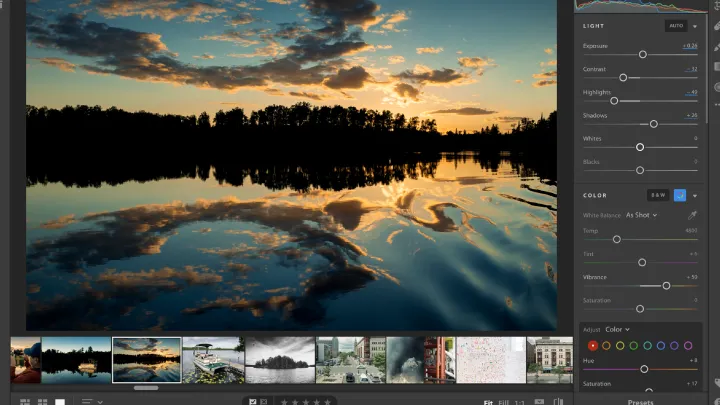
Adobe Lightroom CC is more than just a photo-editing app—it’s the gold standard for both professional photographers and serious hobbyists. It combines powerful editing tools with a clean, user-friendly interface, making it possible to achieve studio-quality results on your phone.
One of Lightroom’s strongest features is its ability to control every aspect of an image. You can fine-tune exposure, contrast, highlights, shadows, whites, and blacks with precision. Its color grading tools allow for advanced adjustments to hue, saturation, and luminance (HSL), giving you complete mastery over tones. For those who want cinematic vibes or moody aesthetics, Lightroom’s curve tool and split toning open up endless creative possibilities.
What sets Lightroom apart is its non-destructive editing system. Unlike basic apps where edits permanently alter the photo, Lightroom saves every adjustment as a layer, allowing you to revert or tweak changes at any time. This gives you flexibility and confidence to experiment without fear of “ruining” a shot.
The app also comes with customizable presets—both built-in and user-created—that can transform your photos with a single tap. Professional photographers often sell their presets online, which can be imported into Lightroom to replicate signature styles. This has turned Lightroom into not only a tool but also a global community of creatives sharing techniques and aesthetics.
For professionals, the cloud integration is invaluable. Photos edited on your phone sync seamlessly with your desktop Lightroom, ensuring a smooth workflow. You can shoot on location with your smartphone, start editing on the spot, and finish the fine-tuning later on your computer.
The only drawback is that the most advanced features, such as selective adjustments with masks or healing tools, are locked behind the subscription. But given the sheer power and flexibility of the app, it’s a worthy investment for anyone serious about photography.
2. Adobe Photoshop Express – Power Meets Simplicity
If Lightroom feels like the professional studio, then Photoshop Express is like the fast, efficient toolkit you carry everywhere. It’s designed for quick edits with a focus on simplicity, making it perfect for beginners or those who need polished results in minutes.
Photoshop Express includes all the essentials—cropping, rotating, resizing, and adjusting exposure and contrast. But what makes it stand out is the inclusion of advanced features normally found in desktop Photoshop, such as blemish removal, noise reduction, and perspective correction. With just a few taps, you can erase unwanted objects, smooth skin, or fix distorted angles.
The app also excels at creative enhancements. It offers a library of filters, vignettes, and frames that instantly transform photos into eye-catching visuals. Its collage maker allows you to combine multiple shots into dynamic layouts—great for social media or storytelling. Unlike Lightroom, which demands a bit of learning, Photoshop Express is all about accessibility. Even if you’ve never edited a photo before, you’ll feel at home.
Another underrated strength is how light and fast the app is. It doesn’t require the same level of processing power as Lightroom, making it ideal for older devices or quick edits on the go. It’s also free, with optional in-app purchases for premium features, which makes it accessible to everyone.
For photographers who want speed without sacrificing quality, Photoshop Express is indispensable. It won’t replace Lightroom for deep editing, but it complements it perfectly. Think of it as the everyday carry tool that helps you polish and share photos instantly, while Lightroom is the workshop where you craft masterpieces.
3. Snapseed – The Artist’s Precision Tool
Snapseed, developed by Google, is often hailed as the best free photo-editing app on the market—and for good reason. It combines professional-level tools with intuitive controls, making it equally appealing to beginners and experts.
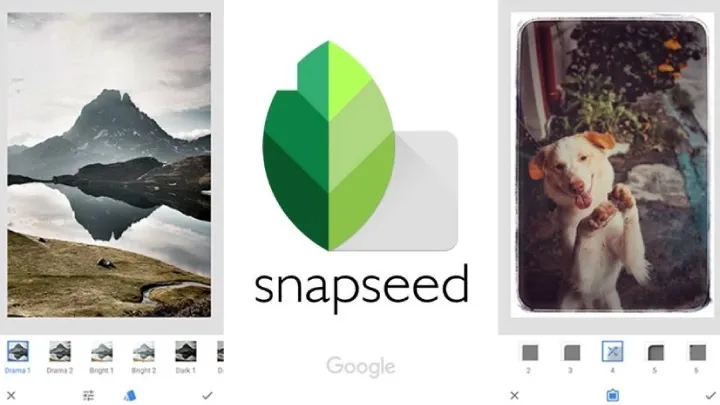
What makes Snapseed shine is its Selective Adjustment feature. Unlike most apps where edits apply to the entire image, Snapseed allows you to target specific areas. For example, if the sky is too bright in your landscape, you can darken only that section without affecting the rest of the photo. This level of precision puts creative control in your hands.
Snapseed also offers a wide variety of filters and effects, from vintage film looks to HDR-style enhancements. Unlike Instagram-style filters that often feel heavy-handed, Snapseed’s tools can be fine-tuned to achieve subtle, natural results. Its black-and-white editing suite is especially powerful, allowing for high-contrast, dramatic monochrome images.
Another standout feature is the “Healing” tool, which lets you remove small imperfections or distractions. It’s not as advanced as Photoshop’s cloning tools, but it’s effective for quick fixes like erasing spots, wires, or blemishes.
Despite its depth, Snapseed remains beginner-friendly. The interface is intuitive, and most tools rely on simple swipe gestures to adjust intensity. You can also save your favorite edits as “looks” and apply them to future photos for consistency.
The fact that Snapseed is completely free with no hidden paywalls makes it one of the most generous tools available. While Lightroom and Photoshop Express are part of Adobe’s paid ecosystem, Snapseed offers high-end editing capabilities at no cost, making it a must-have for photographers at any level.
4. VSCO – Filters, Style, and a Creative Community
If Instagram is about instant sharing, VSCO is about cultivating aesthetic identity. Originally famous for its film-inspired filters, VSCO has evolved into a full-fledged editing app and creative community where photographers showcase their work.
The hallmark of VSCO is its filters—soft, nuanced, and timeless. Unlike flashy, oversaturated filters on other apps, VSCO’s presets emulate the tones of classic film photography. Whether you want the warm, golden look of Kodak Portra or the moody blues of Fujifilm stocks, VSCO delivers. These presets are so influential that they’ve shaped the visual culture of Instagram itself.
Beyond filters, VSCO includes solid editing tools for adjusting exposure, contrast, sharpness, and color. It may not have the same depth as Lightroom or Snapseed, but its strength lies in speed and consistency. With a few taps, you can transform a batch of photos into a cohesive collection with a signature style.
Another aspect that sets VSCO apart is its community. Unlike the algorithm-driven, likes-obsessed culture of Instagram, VSCO emphasizes creativity over validation. Photographers share work for inspiration, not clout, making it a nurturing space for artistic growth.
VSCO does require a subscription to unlock its full filter library and advanced tools, but many users find it worthwhile. For content creators, bloggers, or anyone seeking a distinct visual identity, VSCO is invaluable. It’s less about technical precision and more about emotional resonance, helping your photos evoke feelings rather than just document moments.
5. PicsArt – The Creative Playground
While Lightroom, Snapseed, and VSCO focus on subtle edits and professional polish, PicsArt is about pushing boundaries and unleashing creativity. It’s not just an editing app—it’s a playground where photos become canvases for artistic expression.
PicsArt offers a massive suite of tools, from standard adjustments to advanced features like double exposure, dispersion effects, and drawing layers. It also includes a vast library of stickers, backgrounds, and templates that allow you to transform ordinary images into imaginative artworks. Want to add neon wings to a portrait, blend multiple shots into a surreal collage, or design social media graphics? PicsArt has you covered.
For beginners, the pre-made templates make experimentation easy. For advanced users, the layering system offers Photoshop-like flexibility. It’s one of the few mobile apps that lets you mix photography with graphic design, making it especially popular among digital artists and influencers.
Another highlight is the PicsArt community. Users share edits, challenges, and tutorials, fostering collaboration and inspiration. It’s not just an app but also a social network for creatives who want to learn and showcase their unique styles.
The free version offers plenty, but the premium subscription unlocks advanced features and removes ads. While PicsArt may not suit purists who prefer clean, minimal edits, it’s perfect for those who view photography as a medium for creativity rather than strict realism.
Comparing the Five Apps
Each of these apps excels in different areas, and the best choice depends on your goals as a photographer. If you crave professional precision and cloud integration, Lightroom is unmatched. For quick and accessible edits, Photoshop Express is ideal. Snapseed balances power and simplicity with its precise tools, while VSCO defines aesthetics and style. PicsArt, meanwhile, pushes boundaries into digital art and creative experimentation.
Many photographers actually use a combination of these apps. For instance, you might edit the raw file in Lightroom, fine-tune specific areas in Snapseed, add a signature filter with VSCO, and finish with creative overlays in PicsArt. The beauty of modern mobile editing is that you’re not restricted to one tool—you can build a workflow that suits your vision.
The Future of Mobile Photography
As technology advances, these apps will only become more powerful. AI-driven tools are already making editing faster and smarter, with features like automatic sky replacement or subject isolation. Augmented reality and 3D editing may soon allow photos to become immersive experiences.
The rise of social media ensures that photography remains central to digital culture, but beyond likes and shares, mobile apps are empowering individuals to tell stories, document history, and express themselves visually. What once required a studio and thousands of dollars in equipment can now be achieved with a smartphone and a handful of apps
Conclusion
Photography has entered a golden age of accessibility and creativity. With apps like Lightroom, Photoshop Express, Snapseed, VSCO, and PicsArt, anyone can create professional-quality photos that capture more than just an image—they capture emotion, style, and vision.
These tools democratize art, turning every smartphone into a potential studio and every user into a storyteller. Whether you’re a beginner snapping family moments, a traveler documenting adventures, or a professional building a portfolio, these apps ensure that your photos are not just memories but masterpieces.
In the end, the camera may capture the shot, but it’s the editing apps that unlock its full potential. With the right tools, your photos can transcend reality and become timeless expressions of creativity.