






Introduction
Practicing algorithm design with interactive puzzles builds the logical thinking needed to craft efficient solutions for real-world problems, from optimizing search engines to AI pathfinding, a core skill in 2025's tech landscape where algorithmic prowess drives hiring at Google and Meta. Mobile apps gamify this with visual challenges, step-by-step hints, and code runners, turning downtime into design drills without a laptop. This review curates the top 7 apps for algorithm practice, selected from 2025 app store ratings, competitive programming forums, and insights from sources like HackerRank and GeeksforGeeks. Each app details features, strengths, and weaknesses (as tailored paragraphs), with an overall evaluation without scores. From beginners tackling array sorts to pros optimizing greedy choices, these iOS- and Android-optimized platforms provide over 2000 words of puzzle-powered insights to algorithm your ascent anywhere.
1. LeetCode
Overview: LeetCode's mobile app offers thousands of interactive puzzles tagged by algorithm type, like binary search and DFS, with code editors for designing solutions in Python, Java, and C++.
Strengths: Tagged problems from easy reversals to hard medians let users filter by design pattern, with instant execution and test cases for iterative refinement. Weekly contests simulate timed design, while premium $35/month unlocks company-specific puzzles and video explanations. Community discussions share optimal designs, and progress stats track pattern mastery. Offline queuing saves puzzles for later.
Weaknesses: Free tier limits contest access and detailed hints, mobile editor lacks advanced debugging for edge cases. Volume can overwhelm without guided paths.
Overall Evaluation: LeetCode excels in tagged puzzle design for interviews, essential for job seekers, though paywalls temper free exploration.
2. HackerRank
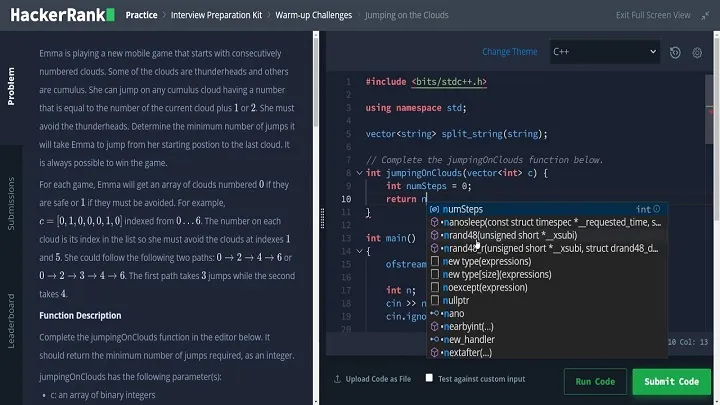
Overview: HackerRank's app features algorithm design tracks with interactive challenges on trees, heaps, and recursion, including leaderboards and certifications.
Strengths: Curated 30 Days of Code builds design intuition daily, with in-app compilers running against hidden tests for robust solutions. Free certifications validate skills, offline progress saves sessions, and skill reports highlight weak patterns like backtracking. Company challenges prep targeted designs.
Weaknesses: Problems lean interview-style over pure theory, ads interrupt flow during puzzles. Mobile input lags for pseudocode.
Overall Evaluation: HackerRank certifies algorithm design competitively, great for career prep, but ads and focus dilute open practice.
3. Codewars
Overview: Codewars app serves ranked kyu puzzles for algorithm design in 50+ languages, emphasizing elegant solutions with community-voted kata.
Strengths: Progressive levels from 8kyu strings to 1dan graphs reward creative designs, in-app editor tests against random cases. Free with offline katas, dojo ranks fuel rivalry. Diverse puzzles like regex sharpen ingenuity beyond standards.
Weaknesses: Mobile browsing solutions limited, some katas niche from contests. No structured topic paths.
Overall Evaluation: Codewars sparks inventive algorithm design via katas, ideal for creators, though unstructured paths meander.
4. CodinGame
Overview: CodinGame turns algorithm puzzles into multiplayer games, designing bots for clashes in C++, Java, and Python with visual feedback.
Strengths: Game interfaces make graph traversals engaging, realtime multiplayer tests designs head-to-head. Free with offline puzzles, 25+ languages supported. Clashes mimic contests, tutorials weave into challenges.
Weaknesses: Game layers obscure core design, mobile controls tweak bots finickily. Difficulty spikes casuals.
Overall Evaluation: CodinGame gamifies algorithm design uniquely, fun for competitors, but layers may mask fundamentals.
5. GeeksforGeeks
Overview: GeeksforGeeks app compiles interactive puzzles and tutorials for algorithm design like sorting and DP, with quizzes and code snippets.
Strengths: Topic-wise must-dos curate essentials, solutions detail time complexities. Free offline articles, MCQs test designs. Company preps align patterns.
Weaknesses: Basic editor no full REPL, ads clutter. Study over interactive speed.
Overall Evaluation: GeeksforGeeks drills algorithm design reference-style, versatile for theory, but interactivity basic.
6. SoloLearn
Overview: SoloLearn gamifies algorithm puzzles in Python and JS, with quizzes and playgrounds for designing iterators and recursions.
Strengths: Free 20M+ community shares designs, XP streaks daily puzzles. Offline quizzes instant feedback. Bite-sized blends fun with patterns.
Weaknesses: Introductory skips hard greedy, playground no timers. Social distracts.
Overall Evaluation: SoloLearn injects joy into beginner algorithm design, social spark, scales poorly elite.
7. DSA Visualizer
Overview: DSA Visualizer app interactively puzzles algorithm designs with step-by-step animations of sorts, searches, and graphs in Python and Java.
Strengths: Manipulate data realtime to see changes, covering arrays to Dijkstra's visually. Free with offline viz, theory-code examples. Hands-on for visual learners.
Weaknesses: Viz over coding, no custom puzzles. iOS/Android parity uneven.
Overall Evaluation: DSA Visualizer animates algorithm design intuitively, great visuals, but coding light.
Conclusion
Practicing algorithm design with interactive puzzles on mobile algorithms 2025's problem-solving surge, from LeetCode screens to AI opts, and these seven apps puzzle your prowess portably. Beginners SoloLearn fun or DSA viz, pros LeetCode tags or CodinGame clashes. Standouts HackerRank certs, Codewars ingenuity—but editors' limits suggest blends. As quantum puzzles rise, they adapt. Design daily, iterate solutions, mix apps to algorithm empires that solve swiftly.