







In today’s digital world, video games have become more than just a hobby—they are a way of life for millions of players around the globe. Whether it’s spending hours in immersive open-world adventures, competitive online matches, or casual mobile games, the time spent gaming can quickly add up. While gaming can be fun and even beneficial for stress relief and skill development, uncontrolled gaming habits may lead to poor time management, decreased productivity, or even health concerns.
This is where game time management apps come into play. These applications are designed to help gamers strike the right balance between enjoying their favorite titles and maintaining a healthy lifestyle. From setting time limits and tracking daily sessions to providing parental control features, these apps ensure that gaming remains enjoyable without becoming overwhelming.
In this article, we’ll explore some of the top applications for managing gaming time, covering their strengths, weaknesses, and overall effectiveness. Whether you’re a hardcore gamer, a casual player, or a parent looking to monitor your child’s screen time, these tools can make a meaningful difference.
1. RescueTime
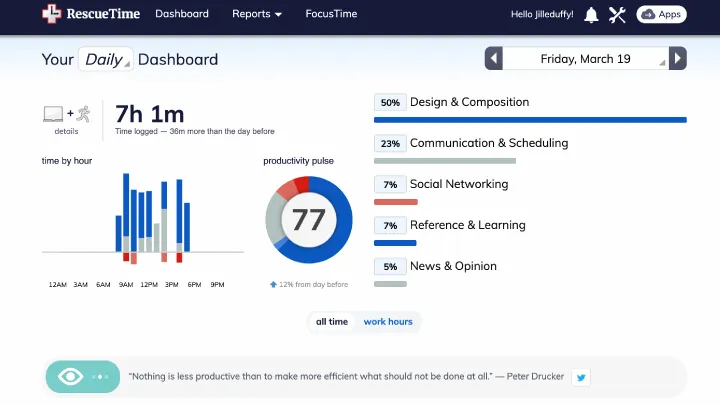
RescueTime is one of the most popular productivity and time management apps available today. While not exclusively designed for gaming, it offers robust tracking tools that allow users to monitor how much time they spend on specific applications—including games.
Strengths:
- Automatically tracks time spent on apps and websites.
- Offers detailed reports to show gaming habits.
- Provides productivity scoring to evaluate usage.
- Helps set alerts and goals for balanced use.
Weaknesses:
- Not specifically tailored for gaming.
- Requires customization to track gaming sessions effectively.
- The free version has limited features.
Evaluation:
RescueTime is an excellent choice for gamers who want to understand their habits better. Its analytics-driven approach makes it ideal for self-regulation. However, players looking for direct parental controls or game-specific timers may prefer dedicated gaming apps.
2. GameTrack
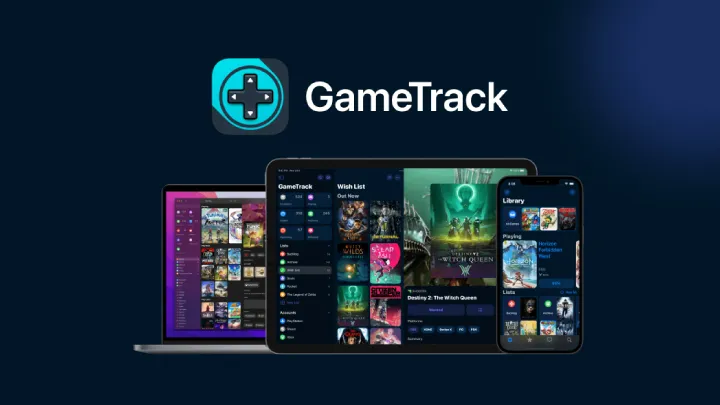
GameTrack is designed specifically for gamers who want to manage their game libraries and keep track of how much time they spend playing.
Strengths:
- Tailored for gamers with a focus on playtime tracking.
- Allows users to log, categorize, and manage gaming sessions.
- Helps organize backlog and completed games.
- Clean, user-friendly interface.
Weaknesses:
- Limited to certain platforms and devices.
- No advanced parental control features.
- Works best for players managing personal libraries rather than parents monitoring children.
Evaluation:
GameTrack appeals to gamers who want a structured way to manage their collections and gaming sessions. While it lacks strict time-limiting features, it shines in organization and awareness.
3. Forest: Stay Focused
Forest is not a traditional gaming timer but a focus-based productivity app that works wonderfully for managing gaming urges. By planting virtual trees that grow when you stay off your phone, it discourages unnecessary game sessions.
Strengths:
- Creative and motivating focus system.
- Rewards users with virtual trees for avoiding distractions.
- Helps build discipline against excessive gaming.
- Encourages healthier phone habits.
Weaknesses:
- Not specifically designed for game time tracking.
- Better suited for mobile gamers rather than PC/console players.
- Limited reporting features.
Evaluation:
Forest is excellent for gamers who struggle with mobile distractions. Its gamified approach makes managing screen time fun, but it may not work well for dedicated console gaming sessions.
4. Qustodio
Qustodio is a parental control app designed for families who want to regulate gaming and screen time across multiple devices.
Strengths:
- Powerful parental control tools.
- Allows parents to set gaming time limits.
- Monitors app usage and online activity.
- Works across Android, iOS, and desktop devices.
Weaknesses:
- Premium subscription required for advanced features.
- Some children may find ways to bypass restrictions.
- Setup can feel complex for beginners.
Evaluation:
Qustodio is one of the best apps for parents concerned about children spending excessive time gaming. It offers strong control and monitoring options but is less useful for adult gamers who want self-regulation.
5. Screen Time (Built-in Feature on iOS/Android)
Both iOS and Android devices come with built-in Screen Time (iOS) and Digital Wellbeing (Android), which help track and manage time spent on apps, including games.
Strengths:
- Free and built directly into smartphones.
- Provides app-specific usage data.
- Allows daily limits and downtime scheduling.
- Works well with all installed apps.
Weaknesses:
- Limited customization compared to third-party apps.
- Can be bypassed easily by savvy users.
- No advanced reports like RescueTime.
Evaluation:
Screen Time/Digital Wellbeing are convenient, easy-to-use tools for casual gamers. While basic, they cover essential needs for monitoring and limiting playtime without needing additional apps.
6. FamiSafe
FamiSafe is another parental control app with strong features for managing gaming and screen time.
Strengths:
- Real-time activity monitoring.
- App blocking and screen time scheduling.
- Location tracking and geofencing.
- Detailed daily reports on usage.
Weaknesses:
- Requires paid subscription for full functionality.
- Some users report occasional syncing issues.
- Primarily designed for parents, not adult gamers.
Evaluation:
FamiSafe is powerful for parents who want a mix of screen time management and safety monitoring. For solo gamers, however, its features may feel excessive.
7. Cold Turkey Blocker
Cold Turkey Blocker is a versatile tool for PC gamers who need to limit their time on specific games or websites.
Strengths:
- Allows blocking games, apps, or websites.
- Offers scheduling and timer options.
- Works offline without needing internet access.
- Highly customizable.
Weaknesses:
- Available only for desktop (Windows, Mac).
- Can be strict—once activated, blocks cannot be easily undone.
- Lacks gamified motivation features.
Evaluation:
Cold Turkey Blocker is ideal for gamers who want tough restrictions. It’s best for students or professionals trying to avoid distractions from PC gaming.
8. Flipd
Flipd is a distraction-blocking app that also works well for limiting mobile gaming.
Strengths:
- Temporarily locks apps, including games.
- Offers focus timers and productivity stats.
- Encourages community-based accountability.
- Great for students balancing study and gaming.
Weaknesses:
- Limited free features.
- May not be effective for console gamers.
- Users sometimes find it too restrictive.
Evaluation:
Flipd is a solid option for gamers who want a simple lockout tool. While not gaming-specific, its focus-driven design helps maintain balance.
9. Norton Family
Norton Family is part of the Norton cybersecurity suite, offering parental controls to manage children’s digital habits, including gaming time.
Strengths:
- Trusted brand with strong security background.
- Comprehensive parental control dashboard.
- Time limits and scheduling across devices.
- Web monitoring alongside gaming restrictions.
Weaknesses:
- Best suited for families, not individual gamers.
- Requires subscription.
- Some features only work on Windows and Android.
Evaluation:
Norton Family is reliable for parents who already use Norton products. It integrates well with broader digital safety but may feel unnecessary for solo players.
10. Stay Focused
Stay Focused is an Android app designed to block or limit app usage, making it effective for mobile gaming management.
Strengths:
- Block specific apps, games, or categories.
- Daily/weekly usage reports.
- Scheduling and timer features.
- Lightweight and simple to use.
Weaknesses:
- Only available on Android.
- Free version has limited features.
- May not track gaming time across different devices.
Evaluation:
Stay Focused is straightforward and effective for Android gamers. While limited compared to multi-platform tools, it delivers essential features for mobile time management.
Conclusion
Video games can be an incredible source of entertainment, creativity, and social interaction. However, when gaming time spirals out of control, it can interfere with productivity, health, and relationships. Luckily, with the wide range of time management apps available today, gamers can enjoy their favorite titles responsibly.
For self-regulating adult gamers, apps like RescueTime, Cold Turkey Blocker, and Stay Focused provide excellent tools for balancing play with daily responsibilities. For parents, apps like Qustodio, FamiSafe, and Norton Family offer peace of mind by monitoring children’s screen habits. Meanwhile, creative alternatives like Forest gamify discipline and encourage healthier usage patterns.
Ultimately, the best app depends on individual needs—whether you want detailed reports, hard restrictions, or simple reminders. By using these tools, you can enjoy gaming as a positive part of life while ensuring it doesn’t take over your schedule.