



Gaming has evolved beyond just playing; it’s about sharing epic moments, showing off skills, and connecting with other players worldwide. Today’s gamers don’t just want to win; they want to capture that winning streak, incredible headshot, or unforgettable clutch and share it with their community. This is where apps for storing and sharing game highlights come in.
These apps allow players to record, edit, store, and showcase their best moments across different platforms, from PC to mobile. Whether you are a casual player who wants to preserve memories or a content creator building an audience, these apps provide the tools to make it possible.
In this article, we’ll explore the top applications for storing and sharing game highlights, reviewing their features, strengths, weaknesses, and overall usefulness.
1. Medal.tv
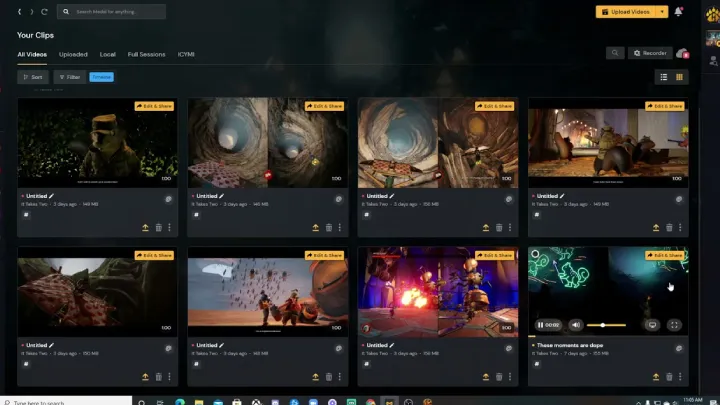
One of the most popular highlight-sharing platforms, Medal.tv is designed specifically for gamers to clip and share moments quickly.
Strengths
- Easy-to-use interface for quick clipping.
- Cloud storage with accessible links for instant sharing.
- Social features such as following, liking, and commenting.
- Supports multiple platforms, including PC, console, and mobile.
Weaknesses
- Limited editing tools compared to professional software.
- Free version has some storage restrictions.
Review
Medal.tv is ideal for gamers who prioritize speed and community sharing. It’s not built for deep editing but shines as a highlight hub.
2. NVIDIA ShadowPlay
For PC gamers with NVIDIA GPUs, ShadowPlay offers seamless recording and instant replay functionality.
Strengths
- Minimal performance impact on games.
- High-quality recording, up to 4K resolution.
- Instant replay lets you capture moments after they happen.
- Integrated with GeForce Experience for easy sharing.
Weaknesses
- Limited to NVIDIA users.
- Lacks advanced community features compared to dedicated highlight apps.
Review
ShadowPlay is best suited for PC players who want reliable, high-quality recording. Its strength lies in performance efficiency rather than social engagement.
3. OBS Studio with Cloud Storage Integration
While OBS Studio is known as a streaming tool, it can also be paired with cloud services to store and share highlights.
Strengths
- Highly customizable recording options.
- Professional-grade quality and control.
- Open-source and free to use.
- Can integrate with cloud services like Google Drive or Dropbox.
Weaknesses
- Steeper learning curve than other apps.
- No built-in community for sharing highlights.
Review
OBS is perfect for serious gamers and creators who want full control over their recordings. While it doesn’t offer instant highlight-sharing features, it excels in flexibility.
4. Xbox Game Bar (Windows 10/11)
Microsoft’s built-in recording tool allows players to capture highlights with just a few clicks.
Strengths
- Already installed on Windows 10/11.
- Simple and easy to use.
- Integrates with Xbox network for sharing clips.
- Minimal setup required.
Weaknesses
- Limited editing functionality.
- Basic compared to third-party software.
Review
Xbox Game Bar is a convenient option for casual players who don’t want to install extra software. It’s functional but lacks advanced features.
5. Discord Clips & Go Live
Discord, primarily a chat app for gamers, also allows users to share clips and stream directly.
Strengths
- Integrated with gaming communities.
- Easy to share highlights within servers.
- Screen recording and live-streaming features.
- Works across PC and mobile.
Weaknesses
- Limited storage for free users.
- Clips aren’t easily discoverable outside private servers.
Review
Discord is great for community-focused sharing. It may not be ideal for reaching a wider audience but is perfect for friends and private groups.
6. Gfycat Gaming
Specializing in short-form highlights, Gfycat offers a platform to upload and share gaming GIFs and clips.
Strengths
- Optimized for short, shareable highlights.
- Easy embedding across social media.
- Great platform for creating memes or quick moments.
Weaknesses
- Not suitable for long-form highlights.
- Platform is more general, not purely gaming-focused.
Review
Gfycat is excellent for players who love turning highlights into quick, shareable moments. It’s more casual compared to traditional highlight apps.
7. Twitch Clip Manager
Twitch allows streamers and viewers to create and store clips of live gameplay.
Strengths
- Built directly into Twitch streaming.
- Easy to create and share clips in real time.
- Popular among gaming communities.
- Clips can go viral quickly if shared.
Weaknesses
- Primarily tied to live streaming.
- Not ideal for offline or non-streaming players.
Review
Twitch Clips is perfect for streamers who want to showcase their highlights instantly. However, it’s less useful for players who don’t stream.
8. Outplayed by Overwolf
Outplayed is designed specifically for auto-recording highlights across many popular games.
Strengths
- Automatic highlight detection for supported games.
- Easy clipping and sharing features.
- Large game compatibility.
- Free with solid functionality.
Weaknesses
- Requires Overwolf platform, which can feel heavy.
- Occasional issues with unsupported games.
Review
Outplayed is great for players who want automation. It removes the hassle of recording manually and is especially useful for competitive gamers.
9. Plays.tv (Legacy Option)
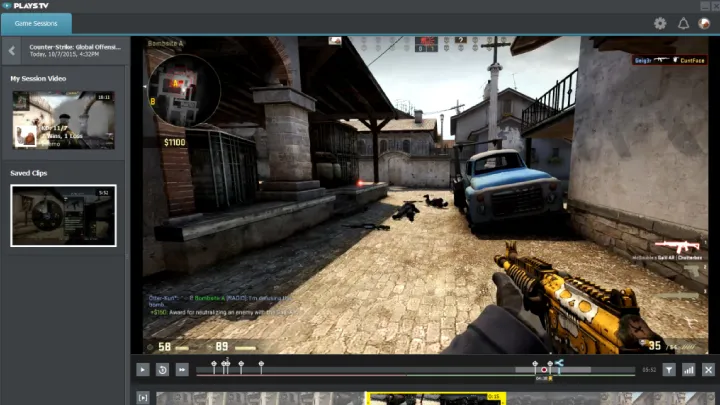
Although Plays.tv has officially shut down, it was one of the pioneers in game highlight sharing. Many alternatives today are inspired by it.
Strengths
- Easy recording and sharing system.
- Social engagement built into the app.
- Strong community during its active years.
Weaknesses
- No longer officially supported.
- Features now scattered across different apps.
Review
While Plays.tv is gone, its legacy influenced apps like Medal and Outplayed. It deserves mention for shaping how gamers share highlights today.
10. YouTube Gaming Uploads
YouTube remains one of the most popular destinations for sharing highlights, even if not designed as a highlight app.
Strengths
- Massive global reach.
- Permanent cloud storage for free.
- Monetization options for creators.
- Works across all devices.
Weaknesses
- Requires manual editing before upload.
- Not specialized for quick clipping.
Review
YouTube is perfect for those who want to archive highlights permanently and reach a wide audience. While it takes extra steps, it’s the most powerful platform for exposure.
Conclusion
The best apps for storing and sharing game highlights depend on your needs. For quick sharing and community engagement, Medal.tv and Outplayed are excellent. If you’re a streamer, Twitch Clips or Discord may be more suitable. For professional-grade recording, OBS Studio and ShadowPlay are unbeatable.
Gamers now have more tools than ever to capture and share their best gaming moments. Whether you’re preserving memories with friends or building an online career, these apps ensure your highlights live on long after the match ends.













![Simpsons [HORROR]](https://arbcdn.techfast.vn/0b51753c5bc9486bb6dfb8974ef220ab.webp)