





Mobile gaming has grown into a massive industry, with millions of players around the world enjoying everything from casual puzzle titles to competitive esports-level shooters. However, one common issue that every mobile gamer faces is lag, overheating, and inconsistent performance. Even with powerful smartphones, background apps, unoptimized systems, and poor memory management can reduce gaming performance.
That’s where game booster apps come in. These tools optimize your device by clearing RAM, managing background processes, reducing latency, and sometimes even improving graphics performance. Whether you’re playing on Android or iOS, a good game booster can make a noticeable difference in smoothness, responsiveness, and battery efficiency.
In this article, we’ll explore the top apps that boost gaming performance on both platforms, analyze their strengths and weaknesses, and help you find the best option for your needs.
1. Game Booster – One Tap Advanced Speed Up (Android)
This popular Android app offers a simple yet powerful way to instantly free memory and improve gaming performance with one tap.
Strengths:
- Quick RAM cleanup and CPU optimization.
- Custom game library to launch optimized titles directly.
- User-friendly design with minimal setup.
Weaknesses:
- Limited advanced settings for pro users.
- Some features locked behind premium.
Overall:
Best for casual gamers who want an easy, one-click solution without dealing with complicated settings.
2. Game Booster 4x Faster (Android)
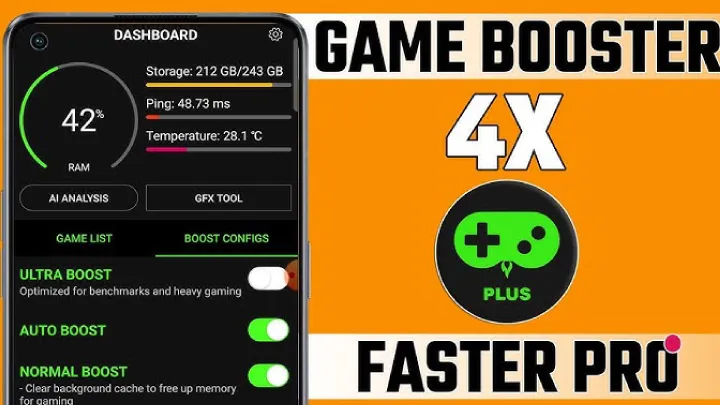
One of the most advanced boosters, Game Booster 4x Faster offers AI-based optimization for graphics and speed.
Strengths:
- GFX tool integration for improved visuals.
- AI performance tuning for different games.
- Support for HDR and ultra-high FPS in supported games.
Weaknesses:
- Requires technical knowledge to fully utilize.
- Can drain battery faster if settings are too aggressive.
Overall:
Perfect for gamers who love PUBG Mobile, Free Fire, or Call of Duty: Mobile, as it enhances both performance and graphics.
3. Gaming Mode – Game Booster PRO (Android)
Gaming Mode is an automation tool that adjusts system settings whenever you launch a game.
Strengths:
- Blocks notifications and calls during gameplay.
- Auto-adjusts brightness, sound, and performance modes.
- Highly customizable for different games.
Weaknesses:
- Setup takes time.
- Some automation may not work on older devices.
Overall:
Ideal for players who want a distraction-free gaming experience, ensuring smoother gameplay and uninterrupted focus.
4. Game Turbo (Xiaomi MIUI Exclusive – Android)
Game Turbo is Xiaomi’s built-in game optimization system, available on MIUI devices.
Strengths:
- System-level optimization for Xiaomi phones.
- Network boost for lower ping.
- In-game tools like screen recording and voice changer.
Weaknesses:
- Only available for Xiaomi/POCO/Redmi devices.
- Limited third-party compatibility.
Overall:
For Xiaomi users, Game Turbo is one of the best built-in boosters, offering both performance and utility tools in one package.
5. Razer Cortex: Game Booster (Android & iOS)
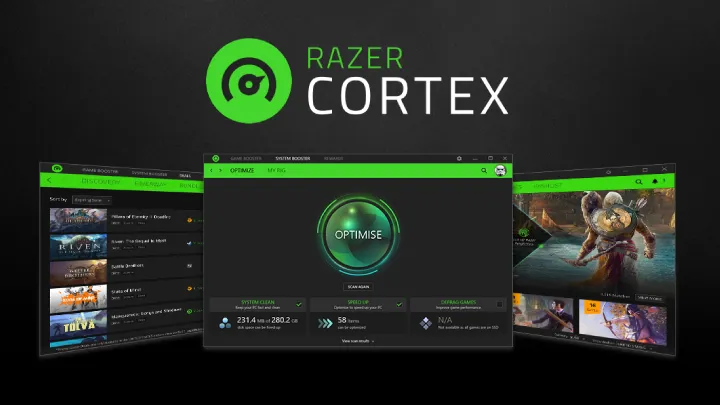
Developed by Razer, a leading gaming hardware brand, Razer Cortex is a trusted performance booster available on both platforms.
Strengths:
- Frees RAM intelligently for games.
- Built-in game deals and rewards system.
- Works across both Android and iOS.
Weaknesses:
- Some users report minor battery drain.
- Features vary slightly between iOS and Android versions.
Overall:
A reliable option for gamers who want a trusted brand solution that enhances performance without overcomplicating things.
6. Game Booster – Speed Up & Live Stream (Android)
This app not only boosts performance but also integrates live-streaming features for mobile gamers.
Strengths:
- Supports streaming to Twitch, YouTube, and Facebook.
- Enhances FPS stability.
- Allows screen recording with boosted performance.
Weaknesses:
- Requires high-end device for streaming and gaming simultaneously.
- Some features locked behind premium.
Overall:
Best for gamers who want to stream and play simultaneously without experiencing major lag.
7. Game Master (iOS – Jailbreak Required)
On iOS, system-level boosters are limited, but Game Master (for jailbroken devices) allows deeper optimization.
Strengths:
- Unlocks FPS settings in games.
- Tweaks system resources for smoother performance.
- Customizable profiles for each game.
Weaknesses:
- Requires jailbreaking, which voids warranty.
- Limited community support.
Overall:
A powerful but risky option for advanced iOS users who want maximum control over their device’s performance.
8. Panda Game Booster (Android)
Panda is a well-known GFX tool + booster hybrid app that lets you customize graphics and speed.
Strengths:
- Unlocks higher FPS and resolution.
- Supports multiple major titles.
- Smooth user interface with regular updates.
Weaknesses:
- Not officially supported by all games (risk of ban in competitive titles).
- Some features require payment.
Overall:
Great for gamers who want to push visuals beyond default settings and enjoy higher refresh rates.
9. Cleaner & Game Booster Pro (iOS & Android)
This app works as both a device cleaner and a game accelerator, making it versatile.
Strengths:
- Removes junk files and unnecessary cache.
- Boosts performance with one tap.
- Available for both iOS and Android.
Weaknesses:
- Less focused on advanced gaming features.
- Free version has ads.
Overall:
Good for casual gamers who want a balanced cleaner + booster app for everyday use.
10. Gaming Mode – GFX & Booster (Android)
Not to be confused with the earlier Gaming Mode, this app combines graphics customization and performance tweaks.
Strengths:
- Lets you adjust resolution, FPS, and shadows.
- Provides network optimization for reduced lag.
- Useful for competitive mobile gaming.
Weaknesses:
- Complex settings for beginners.
- Risk of compatibility issues in some games.
Overall:
A great tool for competitive players who want both speed and graphics customization.
Strengths and Weaknesses of Game Booster Apps
Strengths
- Performance Boost: Free up RAM and CPU for better gaming.
- Network Optimization: Reduce ping and stabilize connections.
- Distraction-Free Gaming: Block notifications and calls.
- Customization: Adjust graphics and FPS to suit your device.
Weaknesses
- Battery Drain: Some apps push performance at the cost of power consumption.
- Compatibility Issues: Not all games support boosters or GFX tools.
- Risk of Account Ban: Using third-party boosters with competitive games may lead to penalties.
- Platform Limitations: iOS restricts boosters unless jailbroken.
Conclusion
As mobile games grow more demanding, game booster apps are becoming essential tools for casual players and hardcore gamers alike. On Android, apps like Game Booster 4x Faster, Gaming Mode, and Razer Cortex stand out for their performance and features. On iOS, options are limited due to system restrictions, but tools like Razer Cortex and Cleaner & Game Booster Pro still provide noticeable improvements.
Ultimately, the best booster depends on your needs:
- If you want simple one-tap optimization, go for apps like Game Booster – One Tap Speed Up.
- If you’re a competitive gamer, try Game Booster 4x Faster or Panda Game Booster.
- If you want multi-purpose cleaning + boosting, Cleaner & Game Booster Pro is a great choice.
With the right tool, you can enjoy smoother gameplay, fewer lags, and a more immersive gaming experience, no matter what device you use.