







Truck Preparation For Driving VR Training is a realistic VR simulation designed to teach safe and effective truck driving skills. Players can practice vehicle inspection, driving techniques, and hazard management in a virtual environment. The game emphasizes preparation, control, and situational awareness, providing a risk-free space to improve driving proficiency.
This guide provides tips on vehicle preparation, VR controls, driving techniques, hazard management, and long-term improvement for trainees and enthusiasts.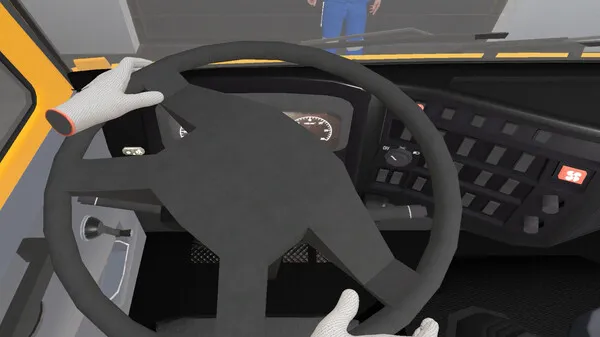
1. Getting Started
- Understanding the VR setup
- Ensure VR headset and controllers are properly calibrated.
- Adjust seating and field of view for comfort and accuracy.
- Basic controls
- Steering: Use VR steering wheel or controller input.
- Acceleration and braking: Use pedals or controller triggers.
- Gear shifting: Manual or automatic options depending on simulation mode.
2. Vehicle Inspection
- Pre-drive checklist
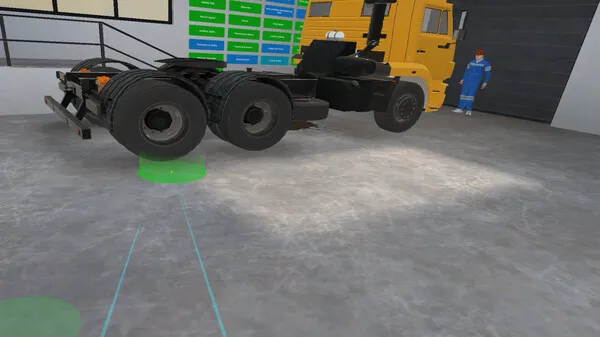
- Check mirrors, brakes, lights, and fuel indicators.
- Inspect tire pressure and load stability virtually.
- Importance of preparation
- Proper vehicle preparation reduces risk of accidents.
- Learn to identify potential mechanical issues in VR before driving.
3. Starting and Stopping
- Smooth start
- Gradually accelerate to avoid wheel spin or load shift.
- Maintain control over vehicle direction while gaining speed.
- Safe stopping
- Use brakes progressively to prevent skidding.
- Keep a safe following distance for emergencies.
4. Maneuvering Techniques
- Turning and cornering
- Slow down for sharp turns; use mirrors to monitor trailer position.
- Practice wide turns for trucks with trailers.
- Reversing and parking
- Use reference points and mirrors for alignment.
- Take time to master trailer control in reverse.
5. Hazard Awareness
- Identifying hazards
- Watch for pedestrians, vehicles, and road obstacles.
- Learn to anticipate changes in road conditions.
- Reaction strategies
- Practice emergency braking and evasive maneuvers.
- Use mirrors and surround view to maintain awareness.
6. Load and Cargo Management
- Securing cargo
- Ensure virtual cargo is balanced and secured.
- Avoid sudden acceleration or braking that could shift loads.
- Weight distribution
- Understand how cargo affects vehicle handling.
- Adjust driving technique based on load position.
7. Driving in Different Conditions
- Weather adaptation
- Simulate rain, snow, or fog for training.
- Adjust speed and braking distances accordingly.
- Night driving
- Use headlights and reduce speed.
- Stay alert for limited visibility hazards.
8. Long-Term Skill Improvement
- Consistent practice
- Regular VR sessions improve reflexes and control.
- Repeat challenging maneuvers to build muscle memory.
- Advanced driving skills
- Master tight turns, reversing with trailers, and emergency stops.
- Practice fuel-efficient driving techniques.
- Evaluation and feedback
- Use VR tracking to review mistakes and improve.
- Analyze driving metrics for progress.
9. Multiplayer and Scenario Training
- Collaborative training
- Engage in virtual convoy exercises or multi-driver scenarios.
- Coordinate maneuvers with other players.
- Scenario challenges
- Practice city driving, highway navigation, or obstacle courses.
- Adapt strategies for different virtual environments.
10. Safety and VR Tips
- Physical safety
- Clear space around VR setup to avoid collisions.
- Take breaks to prevent fatigue and motion sickness.
- Simulation realism
- Treat VR scenarios as real-life practice.
- Focus on accuracy over speed for skill development.
- Equipment care
- Maintain VR headset and controllers for reliable performance.
- Keep software updated for best training experience.
Pros and Cons of Truck Preparation For Driving VR Training
Pros
- Realistic VR truck driving experience.
- Safe environment to practice skills and emergency maneuvers.
- Detailed vehicle inspection and load management training.
- Allows repeated practice without real-world risk.
Cons
- Requires VR hardware and space.
- May induce motion sickness for some users.
- Limited variety in environments compared to real driving.

Conclusion
Truck Preparation For Driving VR Training provides a safe, effective, and immersive environment to learn truck driving skills. By focusing on vehicle inspection, maneuvering, hazard awareness, and advanced techniques, trainees can build confidence and expertise before real-world driving.
Consistent VR practice, attention to detail, and safe training habits are key to mastering truck driving skills.
Final Rating
Truck Preparation For Driving VR Training – 8.5/10
An immersive VR simulation that teaches safe and effective truck driving, perfect for trainees and enthusiasts looking to practice without risk.